



How 1OF1 Cloud Instances Work
Your VPS, your specs, your way. Choose your CPU, RAM, storage, location, and operating system, with a monthly price that updates as you build.

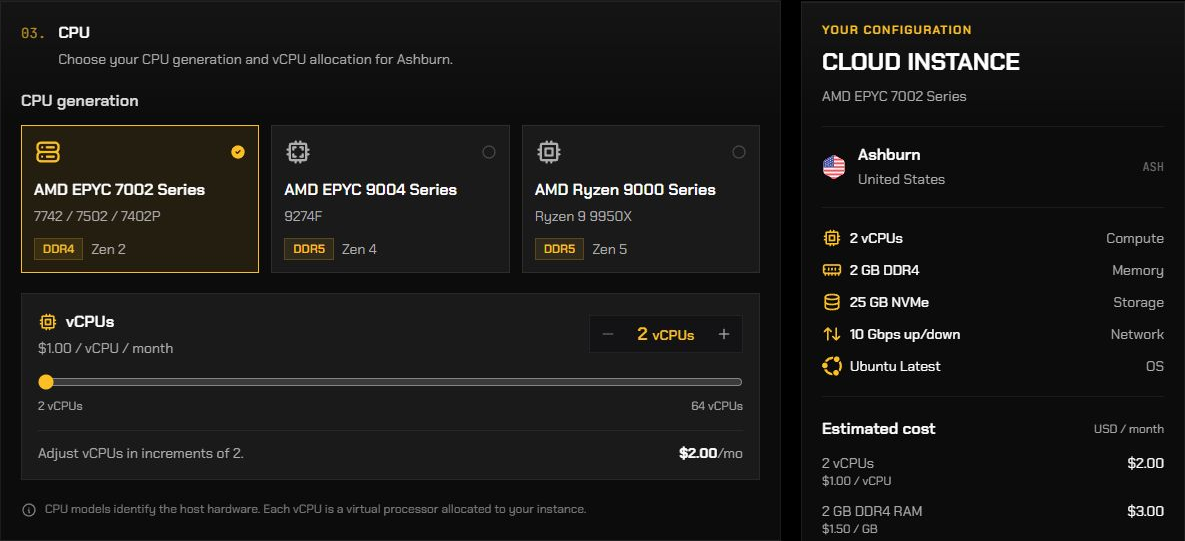
Your VPS, your specs, your way. A 1OF1 Cloud Instance is a virtual private server that you configure yourself. Choose the CPU generation, vCPU count, RAM, NVMe storage, location, and operating system to fit your project.
Our Cloud Instances configurator shows your selections and estimated monthly total as you build. You can adjust CPU, memory, and storage independently before checkout.
Choose your location and CPU generation
Start with the region where you want your instance hosted. The configurator shows availability for the selected CPU generation, along with latency readings where available. It highlights the fastest measured option for your connection, but you can choose another available region to suit your users.
You can then choose from three CPU generations:
| Generation | Hardware family | Memory |
|---|---|---|
| Zen 2 | AMD EPYC 7002 Series | DDR4 |
| Zen 4 | AMD EPYC 9004 Series | DDR5 |
| Zen 5 | AMD Ryzen 9000 Series | DDR5 |
The CPU models shown identify the host hardware. A vCPU is a virtual processor allocated to your instance. Changing the generation changes the resource rates and may change which locations are available.
Set CPU, RAM, and storage independently
Use the sliders or the plus and minus buttons to choose your resources:
| Resource | Available range | Adjustment |
|---|---|---|
| vCPUs | 2 to 64 vCPUs | 2 vCPUs at a time |
| RAM | 2 to 64 GB | 2 GB at a time |
| NVMe storage | 25 to 1,000 GB | 25 GB at a time |
CPU provides processing capacity, RAM holds the data your software is actively using, and storage holds your operating system, files, and installed software. Choose each amount based on what you plan to run.
The memory section also suggests a vCPU count for your selected RAM. For example, 30 GB RAM recommends 12 vCPUs or higher. This is guidance, so you can adjust the CPU allocation to suit your workload.
See how your monthly price is calculated
The configuration summary breaks the estimate into CPU, RAM, and NVMe storage, then shows the monthly total in USD. Changing a resource updates its cost and the total immediately.
RAM volume discounts start above 16 GB. The first 16 GB uses the standard rate. Memory from GB 17 through 32 uses the next tier, and memory from GB 33 through 64 uses a further reduced rate. The discount rates depend on the CPU generation.
For example, choosing 32 GB means the first 16 GB stays at the standard rate and the next 16 GB receives the applicable volume discount. Each reduced rate applies only to the RAM within that range. These savings are already included in the displayed RAM price and monthly total.
10 Gbps networking, a public IPv4 address, and 1OF1Shield DDoS protection are included. You can read more about our protection on the 1OF1Shield page.
Choose an operating system and name your server
Select Ubuntu, Debian, AlmaLinux, Rocky Linux, or Windows from the operating system section. The configurator uses the available template labeled Latest for your chosen system.
Give the instance a name you can recognize, such as my-app-01 or community-server. Your operating system choice and server name travel with your resource selections to checkout.
Once your service is active, use the server panel to manage it. You can add SSH keys there for your Linux server.
Review your instance and continue to checkout
When your configuration is ready:
- Click Review Instance to see the server name, location, CPU generation, resources, operating system, and monthly total together.
- Choose Edit if you want to change anything.
- Choose Deploy Instantly to continue to secure checkout with your selections.
- Review your order and complete checkout.
Adjusting the configurator or opening the review window does not place an order or take payment.
Prefer a package that is already configured?
Our shop also has VPS packages with CPU, RAM, and storage already selected. Choose a package if those specifications fit your needs, or use Cloud Instances when you want to set the resources yourself.
The Black Friday VPS promotion applies to preconfigured VPS packages. Custom Zen 2, Zen 4, and Zen 5 Cloud Instances are excluded.
Ready to build yours? Configure your Cloud Instance.